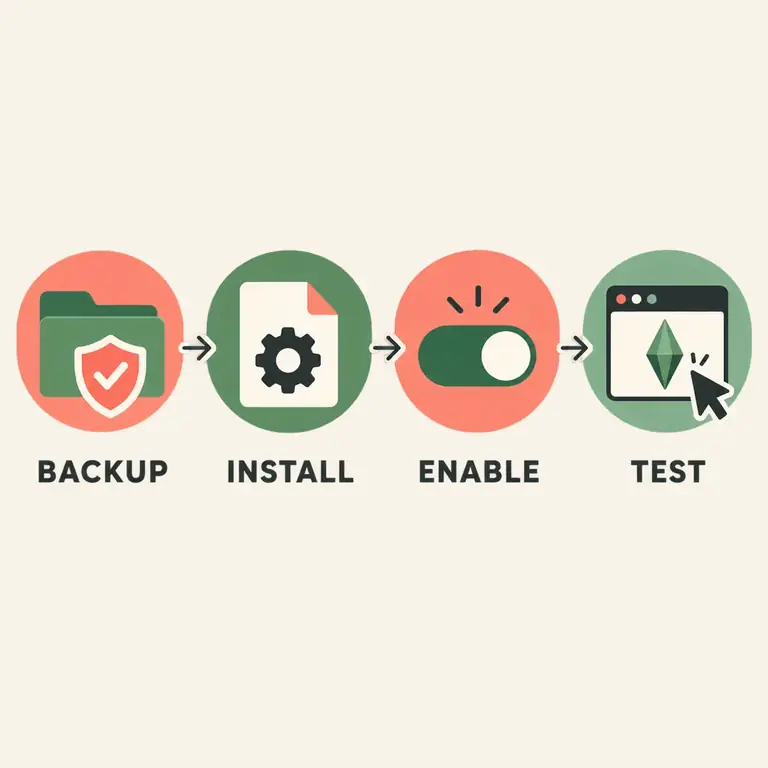
Close The Sims 4, make a save backup, download the current UI Cheats Extension package from the creator, and place its files in a shallow Mods subfolder. In Game Options > Other, enable Custom Content and Script Mods, restart the game, and test one right-click action. If it disappears after an update, remove duplicate or old files, clear the cache, and check the creator’s compatibility note before adding anything back.

What Sims 4 UI Cheats Extension changes
The extension places shortcut behavior close to the values you already see: needs, moodlets, skills, careers, relationships, household funds, and other interface panels. Instead of opening the console and remembering a statistic name, you right-click a supported value and enter or choose the change offered by that release. This is useful for testing a story, repairing a stuck state, or adjusting a household without leaving the current screen.
The word “supported” matters. UI Cheats Extension is maintained outside the base game, and a patch can change the interface element it hooks into. A control that existed in an older release may move, be temporarily unavailable, or require a newer file. Treat the creator’s release note as the source for current behavior. If you need a stable, built-in command, use the relevant vanilla page in this site instead.
- It is a script mod for desktop saves, not a console cheat that works on PlayStation or Xbox.
- It changes the interface around a selected Sim or household; it does not turn every action into a universal household setting.
- The current package, file placement, and patch compatibility matter more than an old tutorial or a random mirror.
- Keep a backup before editing money, relationships, pregnancy states, career levels, or other persistent data.
Install or update UI Cheats Extension safely
The exact archive contents can change, so read the current creator post before extracting. The sequence below is intentionally version-agnostic: it prevents the common mistakes that make a script mod appear to vanish. Console players cannot load this kind of script mod; use the site’s console guides and cheat index for platform commands instead.
On Windows or macOS, close the game before moving files. The Mods folder is normally inside Documents > Electronic Arts > The Sims 4. Cloud-sync tools and OneDrive can redirect Documents, so use the folder that your installation actually reads. A file in Downloads, the desktop, or a second Documents folder will not load.
- 01
Back up the save and current Mods folder
Copy the save you plan to test and, if practical, the existing Mods folder to a separate location. This gives you a rollback if a patch or a script conflict changes a household state.
Quick answer: Do not test a new script in the only copy of an important legacy save.
- 02
Use the creator’s current package
Open the creator page, read the latest compatibility note, and download the package from that source. Do not combine an old .ts4script file with a newer package or keep two differently named copies in Mods.
Quick answer: This page deliberately avoids a hard-coded version number because updates can make it stale.
- 03
Place the files one folder deep
Extract the archive and keep the supplied .ts4script and .package files together in a clear folder such as Mods/UiCheatsExtension. Avoid nested folders several levels deep; script files may not load when the path is too deep.
Quick answer: Keep the original file names unless the creator says otherwise.
- 04
Enable both mod settings
In Game Options > Other, enable Custom Content and Mods and Allow Script Mods. Apply the settings, close the game completely, and launch it again so the script loader starts with the new setting.
Quick answer: A restart is part of the install, not an optional cleanup step.
- 05
Test one low-risk action
Load a copied household, select a Sim, and right-click one supported value. Confirm that the action changes the intended field before testing money, relationships, pregnancy, or career data.
Quick answer: If nothing appears, stop and troubleshoot the loader before adding more files.
Common UI Cheats Extension actions
The table describes the intent of common controls, not a promise that every label appears in every release. A right-click menu may be different after a game patch or when another mod changes the same interface. Read the creator’s notes and test the smallest useful change first.
Use the vanilla cheat index when a console command is clearer or more portable. For example, a money command can be easier to reproduce on a console save, while a right-click interaction is faster for a one-off story adjustment on desktop.
| Interface area | Typical use | Check before saving |
|---|---|---|
| Needs bars | Right-click to fill, lower, or set a need value when the release exposes that control. | Confirm the selected Sim and check that the need, not a neighboring bar, changed. |
| Moodlets and buffs | Remove an unwanted moodlet or inspect a temporary state without opening the console. | Some moodlets are tied to an active event; removing one may not remove the underlying cause. |
| Skills | Set a skill level directly from the skill panel for testing or story setup. | Use a value within the game’s expected range and verify the correct Sim is selected. |
| Career panel | Adjust a career level or related progress when the current release provides the option. | Career branches, packs, and schedules can still affect the next in-game result. |
| Relationships | Change a displayed friendship or romance value from the relationship panel. | Check whether the bar belongs to the intended Sim and whether the relationship type is correct. |
| Household funds | Edit the visible household balance without typing a money command. | Record the starting balance; a direct edit changes the household state immediately. |
| Pregnancy or time controls | Use a supported panel shortcut for a story state when the release documents it. | Treat these as save edits. Make a backup and do not assume a right-click option equals every vanilla pregnancy command. |
What the mod cannot replace
UI Cheats Extension is not a replacement for every Sims 4 cheat. It cannot make a console save load a desktop script mod, and it cannot guarantee that a pack-specific system will behave normally after a patch. A missing menu may be a compatibility issue rather than a user error.
It also does not remove the need to understand scope. A selected-Sim edit is different from a household money edit, and a relationship bar change is different from adding a trait or running a career command. When the goal is a known console operation, link to the appropriate reference: use the enable-cheats guide for the console, the money page for household funds, the skills page for skill syntax, and the relationships page for vanilla relationship commands.
Avoid downloading an “updated” DLL, executable, or repacked archive from an unverified mirror. The creator page is the safest place to check the current package and change notes. EA’s own guidance also recommends disabling mods after game updates until you confirm they are compatible.
When Sims 4 UI Cheats Extension stops working
A missing right-click menu after a patch is usually a loading or compatibility problem, not a reason to stack more files into Mods. Work from the smallest test: remove the extension temporarily, confirm the unmodded game loads, then install one current copy and check the settings again.
Do not infer success from the game’s startup message alone. The useful test is a supported control on a copied household. If that control works, add other mods back in small groups so a conflict has a clear boundary.
The game says mods were disabled
Open Game Options > Other, re-enable Custom Content and Mods plus Allow Script Mods, apply the change, and restart. Major patches commonly turn these switches off for safety.
The extension does not appear at launch
Confirm the .ts4script file is inside the real Mods folder and no deeper than the supported folder depth. Remove duplicate archives, then check that the extension is not still inside a zip file.
It worked before the latest patch
Remove the old copy, read the creator’s current compatibility note, and wait for a compatible release when required. Do not rename an old file and assume the game will accept it.
The menu appears but an action does nothing
Test a different supported panel with a selected Sim. A changed UI element, an incompatible pack state, or a conflict with another script can affect one action while the loader itself works.
Several mods are installed
Move the other script mods out temporarily, delete localthumbcache.package, and test UI Cheats Extension alone. Restore mods in small groups and keep the first failing group for conflict investigation.
The save looks wrong after an edit
Exit without overwriting the backup, restore the copied save, and repeat one change at a time. Persistent edits to money, relationships, career, and pregnancy states are not reliably undone by removing the mod.
Sims 4 UI Cheats Extension FAQ
What is Sims 4 UI Cheats Extension?
It is a desktop script mod that adds right-click controls to supported Sims 4 interface values. It is separate from the vanilla cheat console and must be installed in the Mods folder with Script Mods enabled.
How do I install UI Cheats Extension in Sims 4?
Close the game, back up the save, download the current package from the creator, place its supplied files in a shallow Mods subfolder, enable Custom Content and Script Mods in Game Options > Other, restart, and test one supported control.
Does UI Cheats Extension work on PlayStation or Xbox?
No script mod can be loaded through the console versions of The Sims 4. Use the platform cheat-console guide and the vanilla cheats index for PlayStation or Xbox commands.
Why is Sims 4 UI Cheats Extension not showing up?
Check that the game did not disable mods after a patch, the .ts4script file is not still zipped or buried in nested folders, there is only one current copy, and the game was restarted after changing settings.
How do I update UI Cheats Extension after a Sims 4 patch?
Read the creator’s current post, remove the old copy, install the compatible package, re-enable Script Mods if the patch switched them off, clear the cache, and test on a copied save before restoring other script mods.
Can UI Cheats Extension set Sims 4 skill or career levels?
Many releases expose right-click controls for supported skill and career panels, but the exact menu can change. Verify the current creator notes and use the vanilla skills or careers page when you need a reproducible console command.
Can I use UI Cheats Extension to change pregnancy or relationships?
Some releases expose controls near supported pregnancy or relationship UI. Treat those as direct save edits, make a backup, and confirm the selected Sim and relationship before saving. The presence of a menu is not a guarantee that every vanilla pregnancy command is available.
Should I delete localthumbcache.package?
When troubleshooting a script-mod conflict, removing localthumbcache.package after closing the game is a common cache reset step. It is not a substitute for installing a compatible file or correcting the Script Mods setting.
Where should I download the current UI Cheats Extension file?
Use the creator’s Patreon page and follow its current post or download link. Avoid repacked mirrors and do not rely on a hard-coded version number from an older tutorial.
A reliable decision checklist
Use UI Cheats Extension when you want a quick desktop adjustment beside a visible UI value. Use the vanilla cheat pages when you need a console command, a console platform, or a result that another player can reproduce without the mod. Those are different workflows, so keeping them separate makes troubleshooting faster.
After every major patch, start with the creator’s compatibility note, a save backup, one clean copy of the files, and a one-action test. This page was reviewed on October 14, 2026; the package and supported controls can change with later Sims 4 updates.
Sources and scope
The creator page is the first-party location for the current package and compatibility notes. EA’s guidance is the authority for game-update precautions and mod settings. This independent guide does not host the mod, mirror its files, or claim that an old version is current.